
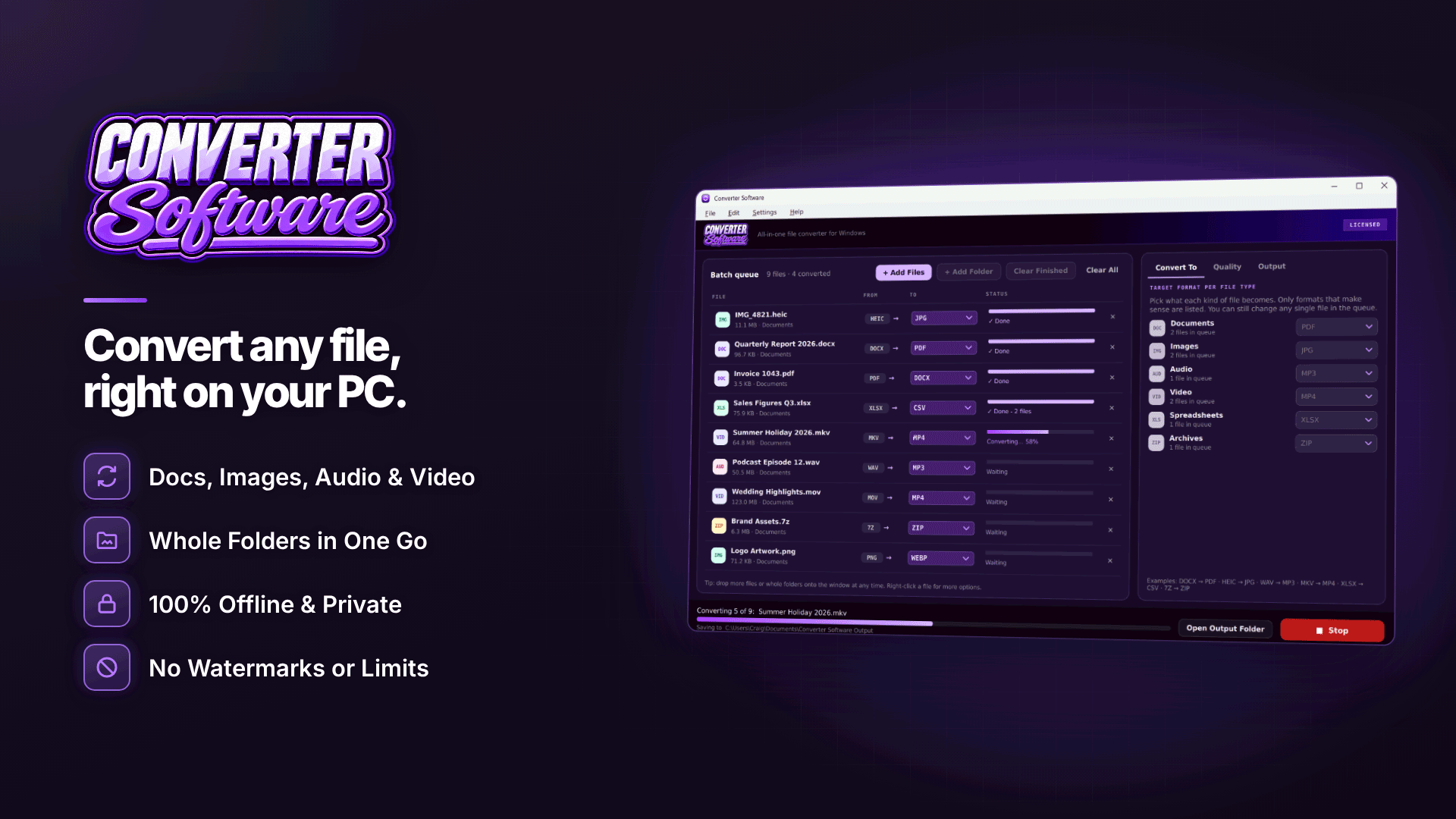
What is the best offline file converter for Windows? For a new affiliate site owner, the best one is a single tool that batch converts every file type you deal with (images, documents, spreadsheets, video, audio and archives) on your own PC without uploading anything. Converter Software is built around exactly that brief, which is why it is worth a look when you are setting up your toolkit.
This overview covers the everyday file chores of running a site, what to look for in a converter, what the software does and where its limits are.
What file chores does a new affiliate site create?
When you start an affiliate website from scratch, you expect to write content and build links. You do not expect to spend an evening converting files, but most new site owners do:
| Task | Typical problem | Conversion needed |
|---|---|---|
| Product and test photos from an iPhone | HEIC files your CMS or older tools reject | HEIC to JPG or WebP |
| Faster pages | Large PNG and JPG images | Resize and convert to WebP |
| Media kit or rate card for partners | Written in Word, needs to be sent as PDF | DOCX to PDF |
| Network and tracker reports | XLSX files you want to import elsewhere | XLSX to CSV |
| Review and tutorial videos | MKV or MOV recordings that will not play everywhere | MKV or MOV to MP4 |
| Downloaded creative packs | 7Z or TAR archives | Extract or repack to ZIP |
What should you look for in an offline file converter?
- Offline processing: contracts, invoices and subscriber exports contain personal data, and uploading them to websites creates privacy risks; see are online file converters safe under GDPR?
- Batch conversion: whole folders at once, not one file at a time.
- Broad format coverage: one tool instead of five.
- Quality control: presets for speed, manual settings when you need them.
- Safe output: originals untouched and no overwritten files.
- No watermarks stamped on your output.
What does Converter Software do?
It is an offline batch file converter for Windows 10 (version 1809 or later) and Windows 11, 64-bit. Files are converted on your PC with nothing uploaded and no watermarks added; the internet is used only for activation and update checks. You can add single files or whole folders, including sub-folders, and mix file types in one run. The Converter Software site lists the supported formats in full, and the main groups are:
- Images: JPG, PNG, HEIC, WebP, GIF, BMP, TIFF, ICO, AVIF and PDF, with resizing, JPG quality from 10 to 100 and optional metadata stripping in the same pass.
- Documents: PDF, DOCX, DOC, ODT, RTF, TXT, HTML, MD and EPUB, with page size options and PDF to PNG or JPG at a chosen DPI.
- Spreadsheets: XLSX, XLSM, XLS, ODS, CSV and TSV, with one CSV per sheet or the first sheet only, and a choice of CSV encoding.
- Video: MP4, MKV, MOV, AVI, WMV, WebM and more, with resolution options (never upscaled), quality levels, frame rate and GIF settings.
- Audio: MP3, WAV, FLAC, AAC, M4A, OGG, WMA and Opus, including extracting a video's soundtrack as MP3.
- Archives: ZIP, 7Z, TAR, GZ and TGZ, repacked or extracted to a new folder.
You set a target format per file type, or override it for individual files, and only suitable formats are offered for each file. One-click quality presets cover images, audio and video, and you can save your own named presets. Output can go to one folder or beside the originals, with optional sub-folder recreation and names kept or given a prefix, suffix, numbering or date stamp. Originals are never changed or deleted, duplicate names are saved as "name (2)", and failed files can be retried.
A beginner's batch workflow
- Create an "inbox" folder where phone photos, downloads and reports land.
- Once a week, add the whole folder to the converter.
- Set targets per type: HEIC to WebP for the site, DOCX to PDF, XLSX to CSV, MKV to MP4.
- Choose a "converted" output folder with sub-folders recreated.
- Convert, check the results, then file or upload them.
The same habit keeps image sizes under control; for more on that, read how to batch resize images to speed up your site.
What are the limits?
- Windows only: Windows 10 (1809 or later) or Windows 11, 64-bit.
- Word for .doc output: writing .doc files needs Microsoft Word or LibreOffice installed, and having one of them is also recommended for the most faithful document conversions.
- Activation required: conversion needs an activated key.
- No adding mid-batch: you cannot add files while a batch is running.
- Lossy formats lose quality: converting to JPG, MP3 or compressed video reduces quality, so keep originals.
- Metadata: stripping is stated for images, not for video or audio.
Common file mistakes new site owners make
- Uploading phone photos straight to the CMS. Full-size images slow pages and may carry location data from wherever you took them.
- Using a different website for every conversion. Each upload hands your files to another third party, and the results are inconsistent.
- Converting the only copy. Keep originals in a separate folder so you can re-export at a different size or quality later.
- Sending editable Word files to partners. A PDF media kit looks more professional and cannot be accidentally changed.
- Opening CSV exports with the wrong encoding. Accented names from European subscribers can turn into garbled characters; choose the encoding your next tool expects.
Frequently asked questions
Do I need a converter if my CMS resizes images?
Your CMS may create smaller copies, but it usually stores your large original too and will not handle HEIC, documents, spreadsheets or video. A converter keeps uploads lean from the start.
Can it convert MKV to MP4?
Yes. MKV and MP4 are both supported video formats, and you can choose resolution and quality settings; video is never upscaled.
Does it need an internet connection?
Only for activation and update checks. Conversion itself works offline.
Next steps
Add a converter to the rest of your stack using our guide to the essential affiliate marketing tools, and see what else to plan for in what it takes to start affiliate marketing. To handle photos, documents, reports and videos in one offline batch tool, try Converter Software.


