To change affiliate links on all pages of a static site at once, download the site files to your PC, run a batch find and replace across the whole folder with a rule that matches the old link (using a regular expression if you need to keep sub-IDs or other parameters), preview every match before writing anything, then upload the changed files. With backups switched on, a mistake can be undone in one step.
Affiliates need this more often than they expect: a programme moves to a new tracking platform, your affiliate ID changes after an account merge, you set up your own tracking domain, or a sponsor closes and you redirect its traffic to a replacement. On a CMS you might fix links in the database or with a plugin; on a static HTML site, the links are written into every file.
Can you avoid editing the pages at all?
Sometimes. If your pages already point to your own redirect links, such as yourdomain.com/go/sponsor/, you only change the destination of the redirect in one place. That is one of the strongest arguments for redirects; see affiliate link redirects explained. If your pages contain raw sponsor URLs, though, those URLs have to change in the files themselves. You can also use the change as a chance to move every link onto your own redirect paths, so the next switch is easier.
What to prepare before a bulk link change
- Get the new link format from the programme, including where your affiliate ID and sub-ID go. Our guide to sub-IDs explains why you want to keep them.
- Collect real examples of the old links from several pages. Links that look identical often differ: some include a campaign parameter, some use http instead of https, some have parameters in a different order.
- Download a fresh copy of the site so you are editing what is actually live.
- Keep an untouched backup of that download, separate from the working copy.
Watch the ampersands: in HTML source, the & between URL parameters is often written as &. A rule written for "&sub=" will miss links written as "&sub=", and vice versa. Check how your files store them before writing the rule.
How to change affiliate links on all pages, step by step
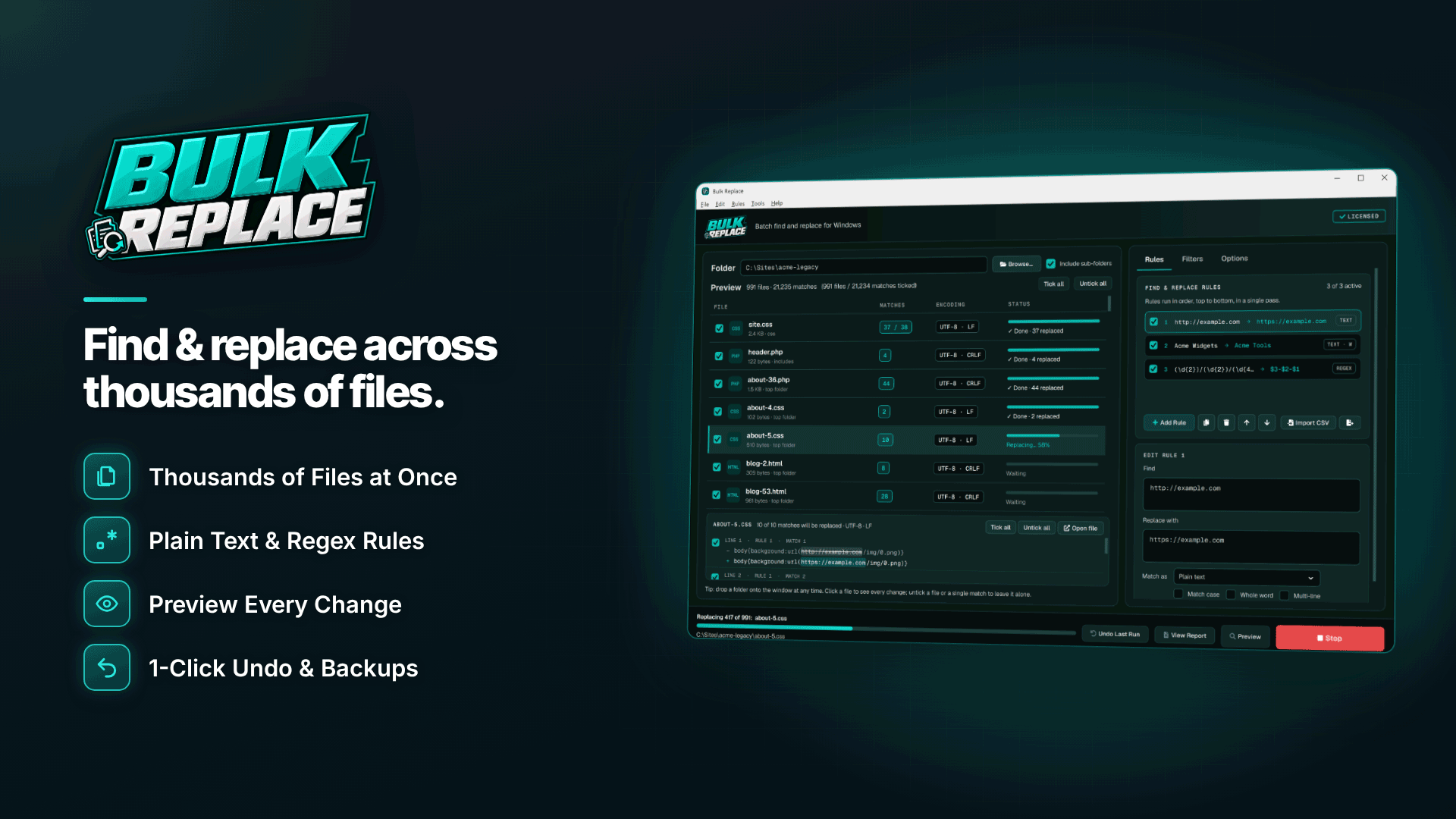
You need a tool that can find and replace in multiple files, through sub-folders, with a preview. On Windows, Bulk Replace is built for this job. It processes every matching file in a folder tree in one run, works entirely offline and backs up each file before changing it. It works on files on your PC, not on a live server or database, which is why the download and re-upload steps matter.
1. Point it at the site folder and filter file types
Choose the downloaded site folder, include sub-folders and limit the run to the extensions that contain links, typically .html, .htm, .php and .js. Skip folders you do not want touched, such as old archives. Binary files like images are skipped automatically.
2. Write the rule
For a simple tracking ID swap, a plain text rule is enough: replace aff=12345 with aff=67890, with whole-word matching so aff=123456 is not caught by mistake. When the whole link format changes but you want to keep the sub-ID, use a regular expression with a capture group. As a hypothetical example, to turn
https://track.oldprogram.example/click?aff=12345&sub=reviews
into https://go.newprogram.example/c/67890?subid=reviews, you would match https://track\.oldprogram\.example/click\?aff=12345&sub=([A-Za-z0-9_-]+) and replace it with the new URL followed by a reference to the first captured group. The sub-ID value is carried across, whatever it was on each page.
3. Stack rules or import them from CSV
Rules run in order in one pass, and you can stack as many as you need, enable or disable them and reorder them. If you are moving several sponsors at once, keep a spreadsheet of old and new links and import it as a CSV rule list, with optional columns for mode and options.
4. Preview every match
The diff preview (F5) shows each file with before and after highlighted, plus total match counts. Nothing is written during preview. Untick any file or individual match that should not change, such as a link in an archived news post you want to leave as it was. If the count is far higher or lower than you expected, stop and check the rule.
5. Run it, then check the report
Each run creates timestamped backups and a CSV change report listing what changed in which file. If something looks wrong, Undo Last Run restores the whole job, and Run history keeps earlier runs (the last 30 by default). File encodings and line endings are preserved.
6. Upload and test
Upload only the changed files with your FTP or SFTP client, then click a sample of links on the live site and confirm each click appears in the new programme's stats with the correct sub-ID.
Moving links to a custom tracking domain
The same method works when you switch from a shared tracking domain to your own. Set up and test the domain first, as described in how to set up a custom tracking domain, then replace only the host part of the URL with a rule that leaves the path and parameters alone.
Common mistakes to avoid
| Mistake | Result | Fix |
|---|---|---|
| Rule too broad | Changes text or links you did not mean to touch | Use whole-word matching and include the domain in the rule |
| Ignoring encoded ampersands | Half the links unchanged | Match both forms, or check the source first |
| Dropping parameters | Lost sub-ID reporting | Capture and reuse them with a regex group |
| Editing on the server | No preview, no undo | Download, change locally, re-upload |
| Not testing clicks | Broken tracking goes unnoticed for weeks | Test a sample of pages after upload |
Frequently asked questions
Can I replace affiliate links in bulk without regex?
Yes, when the old and new links differ by a fixed piece of text such as an ID. Wildcards (* and ?) also work for simple patterns. Regular expressions are only needed when parts of the link vary from page to page and must be kept.
Will it change links inside JavaScript files?
If you include .js in the file filter, yes. Check the preview carefully, because URLs in scripts are sometimes escaped differently from those in HTML.
What about links that are already broken?
A bulk replace only fixes links that match your rule. Run a link check afterwards; our guide to finding and fixing broken affiliate links covers how.
Next steps
Build your old-to-new link list, download the site and test your first rule in preview before committing. For other webmaster utilities, browse the webmaster software and services directory. To run previewed, undoable link changes across every page of a static site, see Bulk Replace.